

Model Exports
In this section, we’ll learn how to export your NimbusDB models to various file formats. We’ll use this items model as an example:
var schema = {    id: {        type: NIMBUSDB_DATA_TYPE.INTEGER,        const: NIMBUSDB_CONSTRAINT.PRIMARY_KEY    },    name: NIMBUSDB_DATA_TYPE.STRING,    price: {        type: NIMBUSDB_DATA_TYPE.NUMBER,        validator: function(data, value) {            return value >= 0;        },        default_value: 0    },    is_locked: {        type: NIMBUSDB_DATA_TYPE.BOOLEAN,        const: NIMBUSDB_CONSTRAINT.OPTIONAL,        default_value: false    }};
items = new NimbusDBModel(id, "items", schema, [    { id: 1, name: "Apple", price: 5 },    { id: 2, name: "Banana", price: 7.2 },    { id: 3, name: "Cherry", price: 15 },    { id: 4, name: "Date", price: 12.5 },    { id: 5, name: "Elderberry", price: 8 },    { id: 6, name: "Fig", price: 10 },    { id: 7, name: "Grape", price: 6 },    { id: 8, name: "Honeydew", price: 9 },    { id: 9, name: "Kiwi", price: 4 },    { id: 10, name: "Lemon", price: 3 }]);
But first, let’s take a look at the available file formats and their behaviors.
File Formats
Section titled “File Formats”| Export Feature | CSV | JSON | JSONL | YAML | TOML | NDBIN | Custom |
|---|---|---|---|---|---|---|---|
| Available | Yes | Yes | Yes | Yes | Optional You need to activate it first | Yes | Yes |
| Data Export | Yes | Yes | Yes | Yes | Yes | Yes | Yes If implemented in the writer function |
| Metadata Export | No | Yes Optional | No | Yes Optional | Yes Optional | Yes | Yes If implemented in the writer function |
| Model Export | No | Yes Optional | No | Yes Optional | Yes Optional | Yes | Yes If implemented in the writer function |
| Enum Export | No | Yes Optional | No | Yes Optional | Yes Optional | Yes | Yes If implemented in the writer function |
| Include Custom Data | No | Yes Optional | No | Yes Optional | Yes Optional | Yes | Yes If implemented in the writer function |
| Asynchronous | No | No | No | No | No | Optional | No |
| File Extension | .csv | .json | .jsonl, .ndjson | .yaml, .yml | .toml | .ndbin | Any |
| Import Feature | CSV | JSON | JSONL | YAML | TOML | NDBIN | Custom |
|---|---|---|---|---|---|---|---|
| Available | Yes | Yes | Yes | No | No | Yes | Yes If implemented in the reader function |
| Data Import | Yes | Yes | Yes | No | No | Yes | Yes If implemented in the reader function |
| Model Import | No | Yes Optional | No | No | No | Yes | Yes If implemented in the reader function |
| Asynchronous | No | No | No | No | No | Optional | No |
| File Extension | .csv | .json | .jsonl, .ndjson | N/A | N/A | .ndbin | Any |
Exporting Model Data
Section titled “Exporting Model Data”Use the export() method to export your model data to a file. If you don’t specify the file extension, NimbusDB will automatically detect the file format based on the file name.
// (1) auto-detect the file formatitems.export("items.csv");      // will be exported as CSVitems.export("items.json");     // will be exported as JSON
// (2) specify the file format/extensionitems.export("items.yaml", {    type: NIMBUSDB_FILE.YAML    // or `extension: NIMBUSDB_FILE.YAML`});
// (3) use the game path as the root directoryitems.export("~/items.csv", {       // the path will be resolved to "working_directory/items.csv"    // options for the export...     // `working_directory` is your game path});
// (4) file extension obfuscation// this allows you to export files to certain formats// without revealing the actual file type through the extensionitems.export("items.mydat", {       // a `.mydat` custom file extension    type: NIMBUSDB_FILE.JSON        // but the content will still be a JSON});
CSV Export
Section titled “CSV Export”The CSV export feature allows you to export your model data to a CSV file, a comma-separated values format that can be easily opened and edited in spreadsheet software.
// (1) basic usageitems.export("items.csv");          // using auto-detect file format
items.export("items.someext", {     // specify the file format/extension    type: NIMBUSDB_FILE.CSV});
items.export_csv("items.csv");      // using the csv export method
// (2) export options// all options are usable for both `export()` and `export_csv()`
// (2.1) custom delimiteritems.export_csv("items.csv", {    delimiter: "; ",                // now "; " is used as the outer delimiter (that used for splitting the data)    inner_delimiter: ","            // and "," is used as the inner delimiter});
// (2.2) custom headers / column orderitems.export_csv("items.csv", { headers: ["id", "name", "price"] // specify the column order});JSON Export
Section titled “JSON Export”The JSON export is the safest and most versatile export format, which can be used anywhere.
// (1) basic usageitems.export("items.json");         // using auto-detect file format
items.export("items.someext", {     // specify the file format/extension    type: NIMBUSDB_FILE.JSON});
items.export_json("items.json");    // using the json export method
// (2) export options// all options are usable for both `export()` and `export_json()`
// (2.1) compact modeitems.export_json("items.json", {    compact: true                   // only export the data in array of objects format});
// (2.2) pretty printitems.export_json("items.json", {    pretty: true});
// (2.3) map the data before exportingitems.export_json("items.json", {    map: function(data) {        data.price -= 2;            // reduce all data's price by 2        return data;    }});
// (2.4) cherry-pick the exported contentitems.export_json("items.json", {    include: {        metadata: ["exported_at", "lib_version"],           // export only "exported_at" and "lib_version" metadata        stats: "all",                                       // export all model's stats        model: ["data", "name", "primary_key", "schema"],   // export only model's "data", "name", "primary_key", and "schema"
// you can also export your own custom data hello: "world", num: 123, arr: [1, 2, 3] }});JSONL Export
Section titled “JSONL Export”The JSONL export is a lightweight format that’s optimized for streaming data.
// (1) basic usageitems.export("items.jsonl");       // using auto-detect file format
items.export("items.someext", {    // specify the file format/extension    type: NIMBUSDB_FILE.JSONL});
// (2) export options// (2.1) append to existing fileitems.export("items.jsonl", {    append: true                    // append the data to the existing file instead of overwriting it});
// (2.2) map the data before exportingitems.export("items.jsonl", {    map: function(data) {        data.price -= 2;            // reduce all data's price by 2        return data;    }});
// (2.3) cherry-pick the exported dataitems.export("items.jsonl", {    start_index: 4,                 // start exporting from the 5th data    length: 2                       // export only 2 data});
// (2.4) modify the start line of the file overwrittenitems.export("items.jsonl", {    // the `append` options must not be set, or set to `false`    // otherwise the `start_line` option will be ignored    start_line: 3,                  // start line for overwriting    start_index: 2,    length: 4    // this will overwrite the 4th - 7th data in the file});
YAML Export
Section titled “YAML Export”The YAML export is a human-readable format that’s easy to read and write.
// (1) basic usageitems.export("items.yaml");        // using auto-detect file format
items.export("items.someext", {    // specify the file format/extension    type: NIMBUSDB_FILE.YAML});
// (2) export options// (2.1) map the data before exportingitems.export("items.yaml", {    map: function(data) {        data.price -= 2;            // reduce all data's price by 2        return data;    }});
// (2.2) cherry-pick the exported contentitems.export("items.yaml", {    include: {        metadata: ["exported_at", "lib_version"],           // export only "exported_at" and "lib_version" metadata        stats: "all",                                       // export all model's stats        model: ["data", "name", "primary_key", "schema"],   // export only model's "data", "name", "primary_key", and "schema"
// you can also export your own custom data hello: "world", num: 123, arr: [1, 2, 3] }});TOML Export
Section titled “TOML Export”The TOML export is also a human-readable format that’s easy to read and write. In NimbusDB, TOML export is not enabled by default, so you need to enable it manually by following the steps below.
Enable TOML Export
Section titled “Enable TOML Export”- Open the extracted NimbusDB package (from the setup instructions).
- Open
Options/export-toml.gmlfile in the package, and select all then copy the content.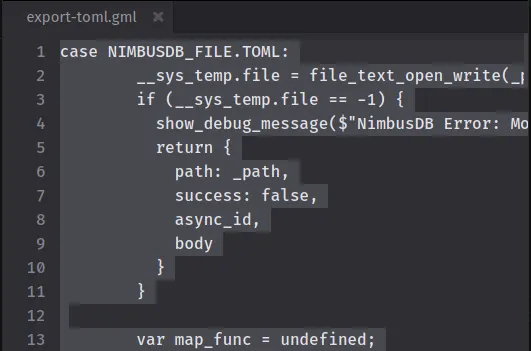
- Open
NimbusDB/NimbusDBModelscript asset in the GameMaker IDE. - Find
/// @options@toml-exportline, selectcase NIMBUSDB_FILE.TOML:untilbreakkeyword, and paste the copied content./// @options@toml-export
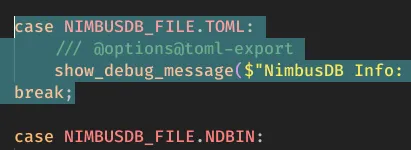
- And later after you’re done, you can undo the changes.
// (1) basic usageitems.export("items.toml");        // using auto-detect file format
items.export("items.someext", {    // specify the file format/extension    type: NIMBUSDB_FILE.TOML});
// (2) export options// (2.1) map the data before exportingitems.export("items.toml", {    map: function(data) {        data.price -= 2;            // reduce all data's price by 2        return data;    }});
// (2.2) cherry-pick the exported contentitems.export("items.toml", {    include: {        metadata: ["exported_at", "lib_version"],           // export only "exported_at" and "lib_version" metadata        stats: "all",                                       // export all model's stats        model: ["data", "name", "primary_key", "schema"],   // export only model's "data", "name", "primary_key", and "schema"
        // you can also export your own custom data        hello: "world",        num: 123,        arr: [1, 2, 3]    }});
// (2.3) custom data options// these options only work on custom data (like `hello`, `num`, and `arr` in the example above)items.export("items.toml", {    include: {        hello: "world",        num: 123,        arr: [1, 2, 3],        nested: {            foo: "bar",            baz: 123        }    },    inline_table: true,     // use object format ({ ... }) instead of table format ([ ... ]) on object data    multiline_array: true   // use multiple lines for array data, with each item on a new line, and wrapped in [ ... ] for arrays of tables});
NDBIN Export Experimental
Section titled “NDBIN Export ”NDBIN is a binary file format that’s optimized for storing NimbusDB model and data. It’s a good choice for large data sets, as it’s smaller and faster to read and write than other formats.
// (1) basic usageitems.export("items.ndbin");          // using auto-detect file format
items.export("items.someext", {       // specify the file format/extension    type: NIMBUSDB_FILE.NDBIN});
items.export_ndbin("items.ndbin");    // using the ndbin export method
// (2) export options// all options are usable for both `export()` and `export_ndbin()`
// (2.1) asynchronous export// you must store the returned object in an instance variableitems_export = items.export_ndbin("items.ndbin", {    async: true});// from this line, there's no guarantee that the export is finished
// you need this line for checking the async export status:if (is_struct(items_export) && ds_map_find_value(async_load, "id") == items_export.async_id) { // then you can write your own logic here // for example, you can check the status of the async export if (ds_map_find_value(async_load, "status")) show_debug_message("NDBIN async export finished successfully"); else { var async_status = ds_map_find_value(async_load, "status"); show_debug_message($"NDBIN async export failed: {async_status}"); }}Custom Writer
Section titled “Custom Writer”The custom writer allows you to write your own logic for exporting the model data to a file. This is useful if you want to export the data in a format that’s not supported by NimbusDB, or if you want to export the data in a format that’s not supported by the built-in file writers.
items.export(function(model, data, temp) {    // write your own logic here    // `model` is the model instance    // `data` is the original data in the model (array of structs)    // `temp` is the temporary data (struct)
    // let's try to export data 1 and 2 into .ini format    model.set_temp({        col_len: array_length(model.__column_names)    });
    ini_open("items.ini");
    ini_write_string("model", "name", model.name);    ini_write_string("model", "primary_key", model.primary_key);    ini_write_string("model", "columns", array_reduce(model.__column_names, function(_acc, _curr, _index) {        return _acc + _curr + (_index == model.temp.col_len - 1 ? "" : ", ");    }, ""));
    ini_write_string("data1", "name", data[0].name);    ini_write_real("data1", "price", data[0].price);    ini_write_real("data1", "is_locked", data[0].is_locked);
    ini_write_string("data2", "name", data[1].name);    ini_write_real("data2", "price", data[1].price);    ini_write_real("data2", "is_locked", data[1].is_locked);
    ini_close();
    return true;});
References
Section titled “References”Model.export()
Section titled “Model.export()”Exports model data using the built-in file writer or custom writer.
Signature
Section titled “Signature”class NimbusDBModel { // ... other methods and properties ... static export( _path: string, _options?: NimbusDBExportOptions ): NimbusDBExportResult;}Parameters
Section titled “Parameters”- Type:
string - The file path to write to.
_options
Section titled “_options”- Type:
NimbusDBExportOptions - Default:
undefined - Optional configuration for the operation.
Returns
Section titled “Returns”- Type:
NimbusDBExportResult - The export result metadata.
Signature
Section titled “Signature”class NimbusDBModel { // ... other methods and properties ... static export( _writer_fn: (model: NimbusDBModel, data: NimbusDBData[], temp: Struct) => boolean | void ): NimbusDBExportResult;}Parameters
Section titled “Parameters”_writer_fn
Section titled “_writer_fn”- Type:
(model: NimbusDBModel, data: NimbusDBData[], temp: Struct) => boolean | void- Parameters:
model: The model instance.data: The data to export.temp: The temporary data.
- Returns:
truewhen the operation succeeds, otherwisefalse, or not returning anything.
- Parameters:
- The custom writer callback used during export.
Returns
Section titled “Returns”- Type:
NimbusDBExportResult - The export result metadata.
Model.export_csv()
Section titled “Model.export_csv()”Exports model data to a CSV file.
Signature
Section titled “Signature”class NimbusDBModel { // ... other methods and properties ... static export_csv( _path: string, _options?: NimbusDBExportCsvOptions ): NimbusDBExportResult;}Parameters
Section titled “Parameters”- Type:
string - The file path to write to.
_options
Section titled “_options”- Type:
NimbusDBExportCsvOptions - Default:
undefined - Optional configuration for the operation.
Returns
Section titled “Returns”- Type:
NimbusDBExportResult - The export result metadata.
Model.export_json()
Section titled “Model.export_json()”Exports model data to a JSON file.
Signature
Section titled “Signature”class NimbusDBModel { // ... other methods and properties ... static export_json( _path: string, _options?: NimbusDBExportJsonOptions ): NimbusDBExportResult;}Parameters
Section titled “Parameters”- Type:
string - The file path to write to.
_options
Section titled “_options”- Type:
NimbusDBExportJsonOptions - Default:
undefined - Optional configuration for the operation.
Returns
Section titled “Returns”- Type:
NimbusDBExportResult - The export result metadata.
Model.export_ndbin()
Section titled “Model.export_ndbin()”Exports model data to an NDBIN file.
Signature
Section titled “Signature”class NimbusDBModel { // ... other methods and properties ... static export_ndbin( _path: string, _options?: NimbusDBExportNdbinOptions ): NimbusDBExportResult;}Parameters
Section titled “Parameters”- Type:
string - The file path to write to.
_options
Section titled “_options”- Type:
NimbusDBExportNdbinOptions - Default:
undefined - Optional configuration for the operation.
Returns
Section titled “Returns”- Type:
NimbusDBExportResult - The export result metadata.
NimbusDBExportOptions
Section titled “NimbusDBExportOptions”An optional configuration object for the NimbusDBModel.export() method.
type NimbusDBExportOptions = Partial<{ type: NIMBUSDB_FILE // override export type, default = AUTO extension: NIMBUSDB_FILE // alias for `type` no_debug: boolean; // [INTERNAL] don't output warning and success debug messages (default = false) no_write: boolean; // [INTERNAL] don't write to file (default = false)}> & ( | NimbusDBExportCsvOptions | NimbusDBExportJsonOptions | NimbusDBExportJsonlOptions | NimbusDBExportYamlOptions | NimbusDBExportTomlOptions | NimbusDBExportNdbinOptions);NimbusDBExportCsvOptions
Section titled “NimbusDBExportCsvOptions”An optional configuration object for the NimbusDBModel.export_csv() method.
type NimbusDBExportCsvOptions = Partial<{ delimiter: string; // cell delimiter (default = ",") headers: boolean | string[]; // include __column_names as header, default = true. string[] = false, and override it with provided array inner_delimiter: string; // inner delimiter (default = ",") columns: boolean | string[]; // alias for `headers`}>;NimbusDBExportJsonOptions
Section titled “NimbusDBExportJsonOptions”An optional configuration object for the NimbusDBModel.export_json() method.
type NimbusDBExportJsonOptions = Partial<{ compact: boolean; // only export the data in array format (default = false) include: NimbusDBExportIncludes; // include additional key-value pairs in the exported data (only works if `compact` is false) map: ( // map the data before exporting (default = undefined) data: NimbusDBData, // isolated copy of the data index: int ) => NimbusDBData; pretty: boolean; // pretty print (default = false) stringify_enum: boolean; // convert data type and constraint enums in the schema to string (default = false, only works if `compact` is false)}>;NimbusDBExportJsonlOptions
Section titled “NimbusDBExportJsonlOptions”An optional configuration object for the NimbusDBModel.export_jsonl() method.
type NimbusDBExportJsonlOptions = Partial<{ append: boolean; // append to existing file instead of overwriting (default = false) length: int; // length of data to export (default = data.length) map: ( // map the data before exporting (default = undefined) data: NimbusDBData, // isolated copy of the data index: int ) => NimbusDBData; start_line: int; // start line for exporting (default = 1, no effect if `append` is true) start_index: int; // start index for exporting (default = 0) index_offset: int; // alias for `start_index` line_offset: int; // alias for `start_line`}>;NimbusDBExportYamlOptions
Section titled “NimbusDBExportYamlOptions”An optional configuration object for the NimbusDBModel.export_yaml() method.
type NimbusDBExportYamlOptions = Partial<{ include: NimbusDBExportIncludes; // include additional key-value pairs in the exported data map: ( // map the data before exporting (default = undefined) data: NimbusDBData, // isolated copy of the data index: int ) => NimbusDBData; stringify_enum: boolean; // convert enum in the schema to string (default = false)}>;NimbusDBExportTomlOptions
Section titled “NimbusDBExportTomlOptions”An optional configuration object for the NimbusDBModel.export_toml() method.
type NimbusDBExportTomlOptions = Partial<{ include: NimbusDBExportIncludes; // include additional key-value pairs in the exported data inline_table: boolean; // inline table (custom data only, default = false) multiline_array: boolean; // multiline array (custom data only, default = false) map: ( // map the data before exporting (default = undefined) data: NimbusDBData, // isolated copy of the data index: int ) => NimbusDBData; stringify_enum: boolean; // convert enum in the schema to string (default = false)}>;NimbusDBExportNdbinOptions
Section titled “NimbusDBExportNdbinOptions”An optional configuration object for the NimbusDBModel.export_ndbin() method.
type NimbusDBExportNdbinOptions = Partial<{ async: boolean; // export asynchronously (default = false)}>;NimbusDBExportIncludes
Section titled “NimbusDBExportIncludes”An optional configuration object for the NimbusDBExportOptions object.
type NimbusDBExportIncludes = Partial<{ metadata: true | "all" | ( // export-only purpose, won't be imported | "db" // nimbusdb (create `source` if not exists) | "exported_at" | "format" | "game_engine" | "lib_version" // NIMBUSDB_LIB_VERSION (create `source` if not exists) | "version" // file version of the used format (JSON, YAML, TOML, etc.) )[]; stats: true | "all" | ( | "data_count" | "row_count" // alias for `data_count` | "column_count" | "cache_count" | "index_count" // alias for `cache_count` | "relation_count" | "total_rows" // alias for `data_count` | "total_columns" // alias for `column_count` | "total_caches" // alias for `cache_count` | "total_indexes" // alias for `index_count` | "total_relations" // alias for `relation_count` )[]; model: true | "all" | ( // true = "all" | "columns" | "custom_id" | "data" | "data_id" | "indexes" // based on `cache` | "name" | "primary_key" | "relations" // can't be imported | "schema" // `validator` or `default` with function/method won't be imported | "temp" )[]; enums: true | "all" | ( // export-only purpose, won't be imported | "constraint" | "data_type" )[]; [key: string]: any; // custom key-value pairs}>;NimbusDBExportResult
Section titled “NimbusDBExportResult”The export result metadata.
type NimbusDBExportResult = { path: string | undefined; success: boolean; async_id: AsyncID | undefined; body: string | undefined; // file content (JSON only)};NIMBUSDB_FILE
Section titled “NIMBUSDB_FILE”An enum that defines the file type to export/import to.
enum NIMBUSDB_FILE { AUTO, CSV, JSON, JSONL, YAML, // export only TOML, // export only NDBIN, // NimbusDB Binary File CUSTOM}